Friday, February 15, 2013

Location of system-jazn-data & user-properties.xml file in Oracle SOA 10g

Location of system-jazn-data & user-properties.xml file in Oracle SOA 10g

$ORACLE_HOME/j2ee/oc4j_soa/config/system-jazn-data.xml”
$ORACLE_HOME/bpel/system/services/config/user-properties.xml”

Monday, February 4, 2013

How to check performance summary of soa servers

Go to em console --> Weblogic Domain --> SOA_Cluster -->soa_server1
Right click on soa_server1 and then select Performance Summary

Sunday, December 9, 2012

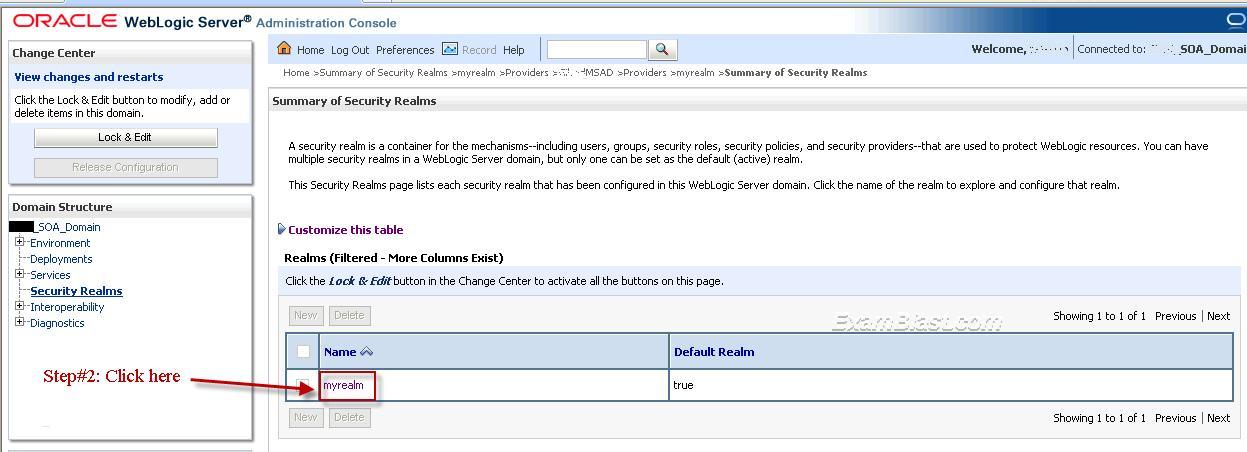
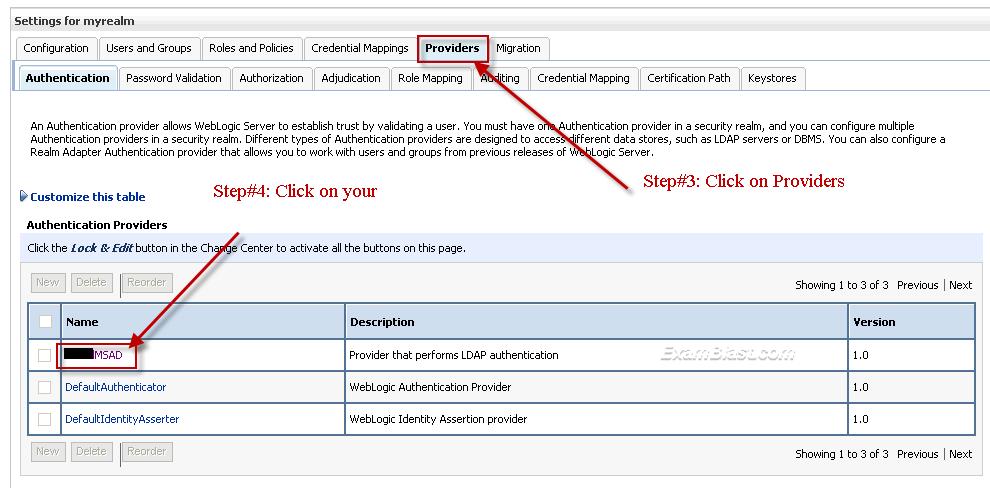
How to see ldap host in weblogic 11g

To see ldap host in weblogic 11g, Please follow steps described in below screen shots: 


Sunday, November 18, 2012

Failed to construct stop command for proc

Unable to bring up SOA OPMN server in 10g, it is being times out even though increased start timeout in opmn.xml.
Got below in opmn logs ==>
11/10/15 14:09:11 [internal] Logging disabled
11/10/15 14:13:23 [ons-internal] ONS server initiated
11/10/15 14:13:23 [pm-internal] PM state directory exists: /gembin/oracle/product/10.1.3/SOA/opmn/logs/states
11/10/15 14:13:23 [pm-internal] OPMN server ready.  Request handling enabled.
11/10/15 14:13:23 [pm-requests] Request 3 Started.  Command: /start?process-type=HTTP_Server
11/10/15 14:13:23 [pm-process] Starting Process: HTTP_Server~HTTP_Server~HTTP_Server~1 (1623668328:0)
11/10/15 14:13:26 [pm-process] Process Alive: HTTP_Server~HTTP_Server~HTTP_Server~1 (1623668328:26696)
11/10/15 14:13:26 [pm-requests] Request 3 Completed. Command: /start?process-type=HTTP_Server
11/10/15 14:13:41 [pm-requests] Request 8 Started.  Command: /start?process-type=home
11/10/15 14:13:41 [pm-process] Starting Process: default_group~home~default_group~1 (1623668329:0)
11/10/15 14:14:16 [pm-process] Process Alive: default_group~home~default_group~1 (1623668329:26760)
11/10/15 14:14:16 [pm-requests] Request 8 Completed. Command: /start?process-type=home
11/10/15 14:14:18 [pm-requests] Request 10 Started.  Command: /start?process-type=oc4j_soa
11/10/15 14:14:18 [pm-process] Starting Process: soa_group~oc4j_soa~soa_group~1 (1623668330:0)
11/10/15 14:24:19 [pm-requests] Request 10 Completed. Command: /start?process-type=oc4j_soa
11/10/15 14:24:19 [pm-process] Stopping Process: soa_group~oc4j_soa~soa_group~1 (1623668330:26883)
11/10/15 14:24:19 [libopmnoc4j] Process Stop Error: soa_group~oc4j_soa~soa_group~1 (1623668330:26883)
11/10/15 14:24:19 [libopmnoc4j] Failed to construct stop command for proc: 1623668330
11/10/15 14:24:19 [libopmnoc4j] Forcefully Terminating Process: soa_group~oc4j_soa~soa_group~1 (1623668330:26883)
11/10/15 14:24:21 [pm-process] Process Stopped: soa_group~oc4j_soa~soa_group~1 (1623668330:26883)
11/10/15 14:52:48 [pm-internal] OPMN server stopped.  Request handling disabled.

Solution ==>

Check for corrupted files and replace with back up files if you have and Remove below lock files
  • scheduler_SCHEDULER_AIA_events.lock
  • scheduler_SCHEDULER_AIA_notifications.lock.
Folder Location:      ORACLE_HOME /j2ee/oc4j_soa/persistence/oc4j_soa_soa_group_1

Saturday, November 17, 2012

Authenctication failed or further authentication required in Oracle B2B

Error received in B2B while sending file to TPs FTP location:

oracle.tip.transport.TransportException: Authenctication failed or further authentication required. Status : 2
        at oracle.tip.transport.basic.SFTPFileSender.send(SFTPFileSender.java:173)
        at oracle.tip.transport.b2b.B2BTransport.send(B2BTransport.java:312)
        at oracle.tip.adapter.b2b.transport.TransportInterface.send(TransportInterface.java:1069)
        at oracle.tip.adapter.b2b.msgproc.Request.outgoingRequestPostColab(Request.java:1801)
        at oracle.tip.adapter.b2b.msgproc.Request.outgoingRequest(Request.java:1008)
        at oracle.tip.adapter.b2b.engine.Engine.processOutgoingMessage(Engine.java:1213)
        at oracle.tip.adapter.b2b.data.MsgListener.onMessage(MsgListener.java:836)
        at oracle.tip.adapter.b2b.data.MsgListener.run(MsgListener.java:402)
        at java.lang.Thread.run(Thread.java:534)

Solution:

Passowrd of FTP has been changed, please login TPs FTP server and check if existing password is working.

Oracle SOA BPEL Process states


Oracle SOA BPEL Process states description


0 -  STATE_INITIATED
1 -   STATE_OPEN_RUNNING
2  -  STATE_OPEN_SUSPENDED
3  -  STATE_OPEN_FAULTED
4  -  STATE_CLOSED_PENDING_CANCEL
5 -   STATE_CLOSED_COMPLETED
6  -  STATE_CLOSED_FAULTED
7  -  STATE_CLOSED_CANCELLED
8  -  STATE_CLOSED_ABORTED
9  -  STATE_CLOSED_STALE
10  -  STATE_CLOSED_ROLLED_BACK

Thursday, November 15, 2012